As of today I have started using a separate blog for my personal views and opinions that do not relate to teaching and learning. When reflecting on my past year of beginning blogging I realised I had more and more to say, and it now extended beyond my profession. I have become a writer, a voice shouting out, blogging has engaged my interest and volumn.
Shaun's Rant & Rave blog can be found in on the side links of 'My Blogs' or click here.
How many blogs do you write and are they for different purposes?

Being deeply learned and skilled, being well trained and using well spoken words: this is good luck. - Buddha
Tuesday, 6 January 2009


Mangere fire a tragic reminder to use smoke alarms | NATIONAL
Mangere fire a tragic reminder to use smoke alarms | NATIONAL
This is a reminder and perhaps a discussion article to use when teaching your class fire safety this year.
Give your children the safety edge.
This is a reminder and perhaps a discussion article to use when teaching your class fire safety this year.
Give your children the safety edge.
Saturday, 27 December 2008
Simply the Best
 Thanks once again to Blogger in Middle-earth, I found another reflective blogger who asks us to reflect on our blogging and choose one that we think is simply the best. Joanna of Confident Writing is compiling this great reflective collection.
I pick a November post, Reflection of an online interview. This post is simply the best because I felt I had taken an emotional moment and reflected on what worked, what I could do next time , as well as extending my critical thinking.
Photo by rexb
Wednesday, 24 December 2008
Bibliography creator I wish I'd had the last 3 years
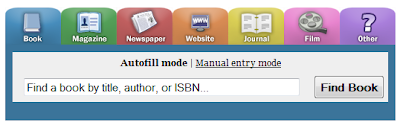 Bibme is an online bibliography creator I found out about from The 2.0 Life, that I wish I knew about during my past three years of studies and essays. As a lifelong learner I intend doing further study in the future, so this will be a gem that I recommend to learners (especially all the student teachers) who need to reference in APA, MLA, Chicago or Turabian formats.
It is easy to use; just type in the title, author or key words and you will be presented with options to add to your list. Then, you enter in keywords (usually author or title), and BibMe finds the results for you. You can reference most media from books to websites, although as with most sites you do need to register to save your lists. Well worth it I say!
iteach on ibeach
 In a recent blog by Jama he talks about how he is over all the ithis and ithat of ipod name variations. Well, while camping yesterday at a beach I thought it would be fun to label it an ibeach. An hour later I noticed a family walk past and one the the kids wrote under my writing. I was honored. So parents, get some literacy practice at the beach these holidays, write an ibeach story and take a photo! I'd love to see yours.
Of course I also had to apply my creative and technology skills to build a sandcastle.
 We collected all the washed up glass on the beach that we could find to use as decoration, a flashy display of wealth. Then as a thanks to the beach, we took all that glass home to recycle. Tread softly.
Thursday, 18 December 2008
Men don't read manuals. Discovering detail.
I have a slightly battered Sony T7 camera, I love my T7. After owning it for over three years now and always wishing it had a macro feature, I finally discovered, it does! And WOW WOW WOW. With me it is true, I never read manuals if I can figure it out first. I'm not proud of that anymore, I have been missing the joy of the little details.

Wednesday, 17 December 2008
Next Generation User Skills
Derek's Blog is always a source of deeply interesting PD resources. The Next Generation User Skills Report he found has some 21st century competencies/skills that we can use as a guide to teaching and assessing. The report focuses on developments in the US, Europe and the UK, and defines a set of skills and identifies the gaps that exist.

Here is the part I found really interesting:

The NGUS investigation broke down 34 competencies, divided into 5 groups. It is these 5 groups that make up the NGUS Competency Model and they do a nice job of showing their interdependence in this diagram from the report:
• Digital Literacy – including safe and social conduct
• Digital Independence – including management of the IT environment
• Enquiry – including the ability to investigate resources
• Participation – including the ability to collaborate
• Production – including ability to create media
Key Competencies are held in high regard in the New Zealand Curriculum and lauded by many to be the key to developing 21st century learners. As beginning teachers we are told to teach to, and grow them if our students stand any chance, and I agree. But, the NZ Curriculum's five key competencies are so broad and vague that none know what aspects of what competency is important to teach and assess. Compare our Key Competencies to the NGUS Competency groups.
• Thinking
• Using language, symbols, and texts
• Managing self
• Relating to others
• Participating and contributing
Already I am thinking that we could be adding to our own competencies!
But STOP, there is more!
The NGUS competency groups are further refined into the 34 competencies. They are key competencies that we can use to guide our teaching and assessment. It is the closest guide I have found so far to scaffold teaching and learning 21st Century skills and competencies. I'd like to be seeing this in our own New Zealand Curriculum, give our teachers some scaffolds too.
A. Enquiry
A1. Formulate questions as online enquiries
A2. Find, gather and collate information
A3. Research & evaluate on-line content & services
A4. Manage references (e.g. bookmarks) in context
A5. Explore a virtual scenario or simulation
A6. Use information to support decision making
B. Digital Literacy
B1. Understand on-line safety, security & privacy
B2. Recognise social responsibility (ethics)
B3. Understand and respect digital property rights
B4. Compose communications to suit target recipients
B5. Learn critically from reviews of published work
B6. Organise, format and enter data
C. Participation
C1. Communicate & share information
C2. Create & maintain an online identity
C3. Submit ratings, reviews & recommendations
C4. Contribute appropriately to networked community activities
C5. Use shared applications
C6. Work collaboratively online towards a goal
C7. Moderate and manage the activities of an online group
D. Production
D1. Create digital artefacts (diagrams, designs)
D2. Capture digital media (visual, audio)
D3. Edit digital media (visual, audio)
D4. Integrate (mash-up) applications and content
D5. Publish digital content (web, PDF, e-book)
D6. Enable content to be discovered online
D7. Control versions of digital assets
E. Digital Independence
E1. Understand technology operations & concepts
E2. Install, link and network hardware
E3. Install and update software
E4. Manage personal infrastructure and data
E5. Use a range of digital and interactive devices
E6. Make appropriate ICT tool selection
E7. Explore and self-learn digital technologies
E8. Synchronise devices and data
Here is the part I found really interesting:

The NGUS investigation broke down 34 competencies, divided into 5 groups. It is these 5 groups that make up the NGUS Competency Model and they do a nice job of showing their interdependence in this diagram from the report:
• Digital Literacy – including safe and social conduct
• Digital Independence – including management of the IT environment
• Enquiry – including the ability to investigate resources
• Participation – including the ability to collaborate
• Production – including ability to create media
Key Competencies are held in high regard in the New Zealand Curriculum and lauded by many to be the key to developing 21st century learners. As beginning teachers we are told to teach to, and grow them if our students stand any chance, and I agree. But, the NZ Curriculum's five key competencies are so broad and vague that none know what aspects of what competency is important to teach and assess. Compare our Key Competencies to the NGUS Competency groups.
• Thinking
• Using language, symbols, and texts
• Managing self
• Relating to others
• Participating and contributing
Already I am thinking that we could be adding to our own competencies!
But STOP, there is more!
The NGUS competency groups are further refined into the 34 competencies. They are key competencies that we can use to guide our teaching and assessment. It is the closest guide I have found so far to scaffold teaching and learning 21st Century skills and competencies. I'd like to be seeing this in our own New Zealand Curriculum, give our teachers some scaffolds too.
A. Enquiry
A1. Formulate questions as online enquiries
A2. Find, gather and collate information
A3. Research & evaluate on-line content & services
A4. Manage references (e.g. bookmarks) in context
A5. Explore a virtual scenario or simulation
A6. Use information to support decision making
B. Digital Literacy
B1. Understand on-line safety, security & privacy
B2. Recognise social responsibility (ethics)
B3. Understand and respect digital property rights
B4. Compose communications to suit target recipients
B5. Learn critically from reviews of published work
B6. Organise, format and enter data
C. Participation
C1. Communicate & share information
C2. Create & maintain an online identity
C3. Submit ratings, reviews & recommendations
C4. Contribute appropriately to networked community activities
C5. Use shared applications
C6. Work collaboratively online towards a goal
C7. Moderate and manage the activities of an online group
D. Production
D1. Create digital artefacts (diagrams, designs)
D2. Capture digital media (visual, audio)
D3. Edit digital media (visual, audio)
D4. Integrate (mash-up) applications and content
D5. Publish digital content (web, PDF, e-book)
D6. Enable content to be discovered online
D7. Control versions of digital assets
E. Digital Independence
E1. Understand technology operations & concepts
E2. Install, link and network hardware
E3. Install and update software
E4. Manage personal infrastructure and data
E5. Use a range of digital and interactive devices
E6. Make appropriate ICT tool selection
E7. Explore and self-learn digital technologies
E8. Synchronise devices and data
Subscribe to:
Posts (Atom)